
Last updated on
Nov 6, 2026
PH Pag-IBIG FLH020 free printable template
pdfFiller is not affiliated with any government organization

Fill out
Complete the form online in a simple drag-and-drop editor.

eSign
Add your legally binding signature or send the form for signing.

Share
Share the form via a link, letting anyone fill it out from any device.

Export
Download, print, email, or move the form to your cloud storage.
Why pdfFiller is the best tool for your documents and forms


End-to-end document management
From editing and signing to collaboration and tracking, pdfFiller has everything you need to get your documents done quickly and efficiently.
Accessible from anywhere
pdfFiller is fully cloud-based. This means you can edit, sign, and share documents from anywhere using your computer, smartphone, or tablet.
Secure and compliant
pdfFiller lets you securely manage documents following global laws like ESIGN, CCPA, and GDPR. It's also HIPAA and SOC 2 compliant.
What is PH Pag-IBIG FLH020
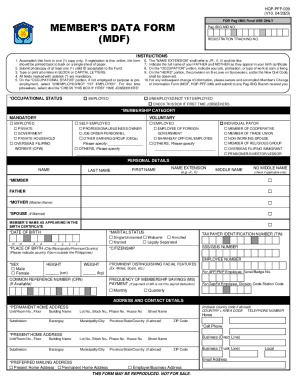
The Pag-IBIG Membership Status Verification Slip is a loan agreement form used by members of the Pag-IBIG Fund in the Philippines to verify their membership status and loan entitlement.
pdfFiller scores top ratings on review platforms




It's been good so far. It tends towards American forms rather than UK forms, but that's OK. It's pretty intuitive.
I'm satisfied with the performance of the software.
Who needs PH Pag-IBIG FLH020?
Explore how professionals across industries use pdfFiller.

PH Pag-IBIG FLH020 is needed by:
-
Pag-IBIG Fund members verifying loan eligibility
-
Individuals seeking additional loans or refinancing
-
Homebuyers needing property purchase verification
-
Employees confirming employer details for loans
-
Home improvement applicants needing funding verification
Comprehensive Guide to PH Pag-IBIG FLH020
What is the Pag-IBIG Membership Status Verification Slip?
The Pag-IBIG Membership Status Verification Slip serves as a crucial document within the Pag-IBIG Fund system. This form allows members to verify their membership status and assess their loan entitlement effectively. It is particularly significant for those seeking loans or intending to purchase properties, as it confirms essential membership details.
Purpose and Benefits of the Pag-IBIG Membership Status Verification Slip
This form offers multiple benefits, including access to a range of loan options tailored for home improvement and refinancing. Moreover, it acts as a vital requirement during loan applications, simplifying the overall process by providing necessary membership information in one document. Utilizing the Pag-IBIG Membership Status Verification Slip ensures smooth navigation through the borrowing experience.
Who Needs the Pag-IBIG Membership Status Verification Slip?
Several segments of Pag-IBIG members may require the Membership Status Verification Slip for different purposes. This includes Pag-IBIG members applying for loans, as well as employers who need it for facilitating employee loan applications. Situations that necessitate submission of this verification slip may arise during loan processing or property acquisitions.
How to Fill Out the Pag-IBIG Membership Status Verification Slip Online
Accurate information is vital when filling out the Pag-IBIG Membership Status Verification Slip online. Here are the steps to complete the form:
-
Begin by entering your name and address accurately.
-
Provide details about your employer, including company name and ID number.
-
Fill out the section on loan purpose clearly.
-
Ensure to include your signature as required.
Completing each field with precision is essential to prevent delays in processing.
Common Errors and How to Avoid Them
When filling out the Pag-IBIG Membership Status Verification Slip, users often encounter common mistakes. Typical errors include miswriting names and addresses. To avoid such pitfalls, it’s crucial to double-check all entries. Reviewing the completed form thoroughly before submission can help ensure all information is correct and complete.
Submission Methods for the Pag-IBIG Membership Status Verification Slip
Submitting the Pag-IBIG Membership Status Verification Slip can be done through several methods. Options include online submission, physical delivery to Pag-IBIG offices, and potential email submissions. Follow these tips to ensure a successful submission:
-
Keep track of your application's deadlines.
-
Check for confirmation of submission to ensure your application is being processed.
What Happens After You Submit the Pag-IBIG Membership Status Verification Slip?
Once submitted, members can expect a processing timeline that varies based on current workloads. Confirmation of submission will be received, allowing members to check their application status comfortably. If issues arise during the verification process, members should be prepared to take necessary actions for clarification or resolution.
Security and Compliance When Handling Your Pag-IBIG Membership Status Verification Slip
Security is a priority when dealing with the Pag-IBIG Membership Status Verification Slip. The submission process incorporates security measures to protect sensitive information. Compliance with regulations such as HIPAA and GDPR assures members that their documents are handled securely throughout the process.
How pdfFiller Can Help You with the Pag-IBIG Membership Status Verification Slip
pdfFiller simplifies the process of managing the Pag-IBIG Membership Status Verification Slip. It offers features allowing users to edit, sign, and share documents with ease. The user-friendly interface enhances the online completion experience, ensuring users feel confident in managing their documents securely.
Getting Started with pdfFiller for Your Pag-IBIG Membership Status Verification Slip
To utilize pdfFiller effectively, follow these simple steps:
-
Access the form directly through the pdfFiller platform.
-
Fill out the required fields as per the guidelines.
-
Take advantage of the editing and signing features for a hassle-free experience.
Benefits of using pdfFiller include improved efficiency compared to traditional methods, along with strong security measures.
How to fill out the PH Pag-IBIG FLH020
-
1.Access pdfFiller and log in to your account. Search for 'Pag-IBIG Membership Status Verification Slip' in the form library.
-
2.Open the form to view its various fillable fields. Familiarize yourself with the layout and sections of the document.
-
3.Before you begin filling out the form, gather the necessary personal information, including your name, home address, and employment details.
-
4.Start by entering the 'Date Filed' at the top of the form, followed by your 'Last Name', 'First Name', 'Middle Name', and 'Maiden Name'.
-
5.Fill in your 'Home Address', including street name, city, and zip code. Add your contact number in the 'Tel. No.' field.
-
6.Provide details about your employer by entering the 'Company/Employer/Business Name', 'Employer ID No.', and 'Company/Employer/Business Address'.
-
7.Indicate your employment status by selecting or inputting information in the 'Status' and 'Employee No.' fields.
-
8.Specify the purpose of the loan in the 'Loan Purpose' section. Detail your employment history in the provided space.
-
9.Place your signature in the designated area labeled 'Member's Signature' and ensure all information is accurate before proceeding.
-
10.Review the completed form thoroughly to ensure no field is left blank and all entries are correct.
-
11.Once you've confirmed everything, save your progress in pdfFiller. You can choose to download the document, print it, or submit it online directly through the platform.

Who is eligible to use the Pag-IBIG Membership Status Verification Slip?
The form is intended for members of the Pag-IBIG Fund who need to verify their membership status and loan entitlement for various purposes, including additional loans and property purchases.
What information must I provide to complete the form?
You will need to input personal details such as your name, address, telephone number, employer information, and the purpose of the loan.
How can I submit the completed form?
You can submit the form via pdfFiller by downloading it, printing it out to be manually submitted, or through any online submission process specified by your Pag-IBIG Fund branch.
Are there any common mistakes to avoid when filling out this form?
Common mistakes include leaving required fields blank, incorrect personal information, and failing to sign the form where indicated. Double-check all entries before submission.
What is the processing time after I submit the form?
Processing times can vary based on the Pag-IBIG Fund's workload, but users typically receive feedback within a few working days. Always check for specific timelines with your local branch.
Is notarization required for this form?
No, notarization is not required for the Pag-IBIG Membership Status Verification Slip, making it easier for members to complete and submit.
What should I do if I make an error on the form?
If you notice an error after filling the form, you can go back to the pdfFiller interface to edit the fields as needed. If the form has been printed, you may need to complete a new one.
Related Content
Related Forms



Related Catalogs
Get the latest insights from our blog


If you believe that this page should be taken down, please follow our DMCA take down process
here
.
This form may include fields for payment information. Data entered in these fields is not covered by PCI DSS compliance.